
You are hiring your first engineers
No ATS, no recruiter, and a founder doing the screening between everything else. You need the process to exist without building one.
What you use
Build the pipeline each role needs, publish it to a careers page that looks like you, let AI take the first screening round, and collect structured feedback from everyone who interviews. HireXAI is the applicant tracking system for teams hiring in India.
Three situations we hear constantly, and the parts of the product that answer them.
No ATS, no recruiter, and a founder doing the screening between everything else. You need the process to exist without building one.
What you use
Different stages for different roles, applicants arriving from four places, and no single view of where anyone actually is.
What you use
Three interviewers, three opinions, and the verdict going to whoever speaks first in the debrief. You need signal, not consensus theatre.
What you use
HireXAI is built around the pipeline, not bolted onto it. Here is what happens at each stage of a hire, and which parts of it are running today.
Stage 1 — Open the role
A job is not a form and a list of applicants. You lay out the stages it takes to hire this person, and every stage carries its own settings and its own email.
Rename, reorder or drop a stage at any time. Renaming never loses a candidate's place.
Rename, reorder or drop a stage at any time. Renaming never loses a candidate's place.
Stage 2 — Get it seen
Every company gets a public, branded jobs page the day it registers — and the same board embeds into your own site in one line.
Your Company
5 open roles
Senior Backend Engineer
Bengaluru · Full-time
Product Designer
Remote · Full-time
Data Analyst
Pune · Contract
Your Company
5 open roles
Senior Backend Engineer
Bengaluru · Full-time
Product Designer
Remote · Full-time
Data Analyst
Pune · Contract
Stage 3 — Take applications
A stranger applies from a link with a résumé and your questions, and lands in the right pipeline with their source recorded — no HireXAI account needed.
Ananya Kulkarni
Applied 4 minutes ago
They can create an account with the same email later and pick the application up where it is.
Ananya Kulkarni
Applied 4 minutes ago
They can create an account with the same email later and pick the application up where it is.
Stage 4 — Screen
Make AI screening a stage in the pipeline: your questions, your call length, your pass mark. It runs itself, and your team reads results instead of making calls.
24 screened overnight · 9 passed
You read the results. Nobody on your team ran the calls.
24 screened overnight · 9 passed
You read the results. Nobody on your team ran the calls.
Stage 5 — Interview
Interviewers rate the same criteria every time, and nobody sees a colleague's card until their own is in — so the panel gives you signal instead of an echo.
2 colleagues have filed feedback you cannot read yet
Theirs unlocks when yours is in, so nobody anchors on the loudest voice in the room.
2 colleagues have filed feedback you cannot read yet
Theirs unlocks when yours is in, so nobody anchors on the loudest voice in the room.
Stage 6 — Decide
When it is time to choose, the argument is already assembled: every round, every score, every note, in order.
Who moved them, who interviewed them and what each person said — on one page, for the whole hire.
Who moved them, who interviewed them and what each person said — on one page, for the whole hire.
A company is not one login. Invite the people who hire with you, give each of them a role, and the product enforces it on every request — not by hiding buttons.
A developer on one job gets nothing at all on another. That rule is checked on every endpoint, every time.
Anyone on any role can also take interview rounds — an HR lead running culture-fit calls, a developer on system design — without a second account.
Invite by email, change someone's role later, and see exactly what each person can reach before you send the invite.
Every company starts with a template for each stage. Edit one, and every email that uses it changes with it.
Application received
Sent the moment someone applies
AI screening
Invites them to the call
Assignment
Carries the brief and the deadline
Interview
Confirms the round and the format
Offer
The one you will rewrite most
Rejection
Seeded, editable, never deletable
Each one is seeded when you register, worded the way the product already sent them, so nothing changes until you decide it should.
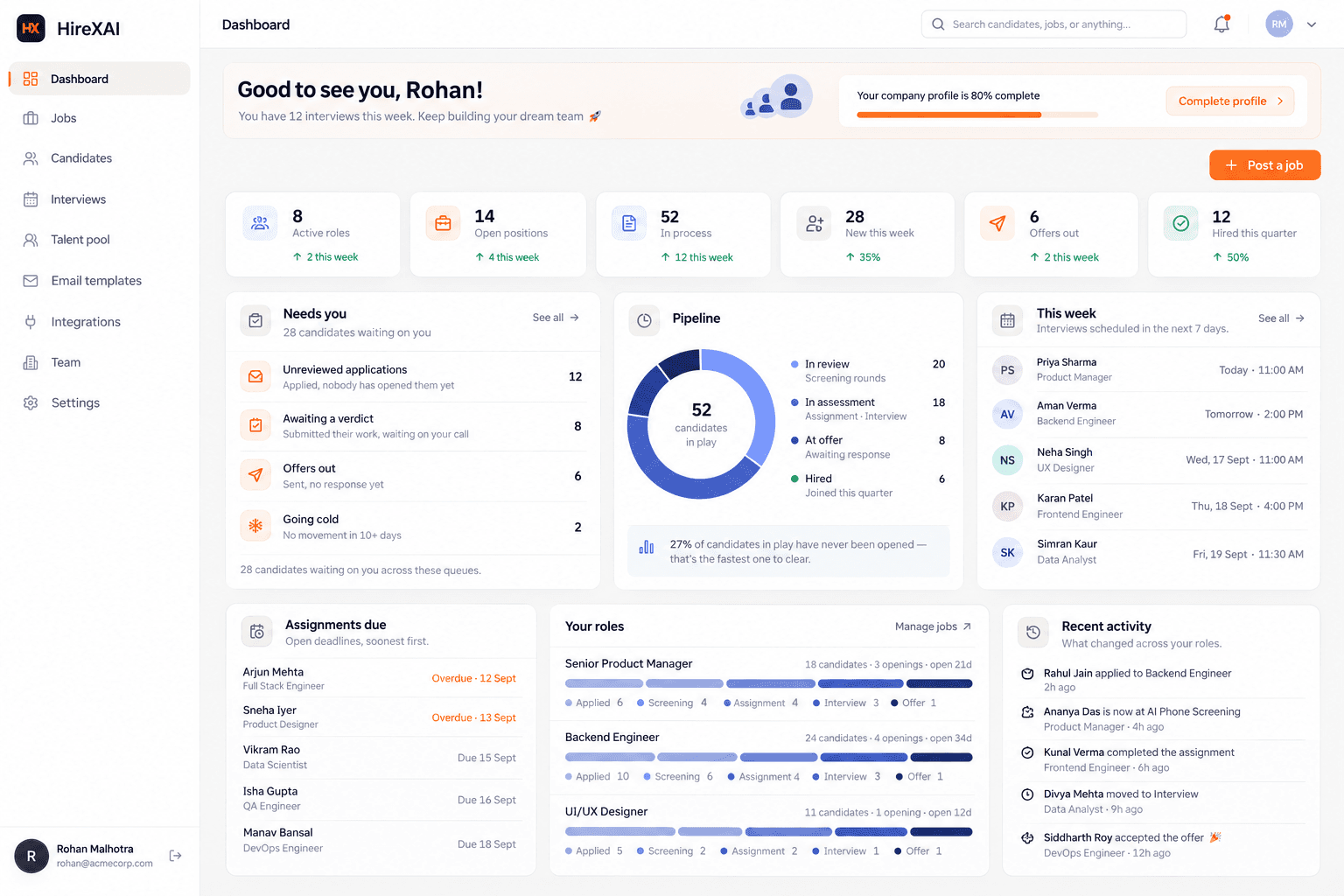
Not a wall of charts. A queue of decisions waiting on a person, the pipeline as it actually stands, and the deadlines about to pass.
Needs you
7
Verdicts, offers and candidates going cold
Unreviewed
23%
Share of the pipeline nobody has opened
Assignments due
4
Deadlines inside the next three days
Alongside them: your open roles, the stages candidates are sitting in, and what moved in the last week — hired, rejected, advanced, applied.
Four of these are live today, and free on every plan. The job boards are waiting on partner approvals, and we would rather tell you that than let you find out after signing.
Career Page
Hiring
A branded public jobs page, and the same board embedded in your own site.
Company email
Communication
Candidates hear from your own Gmail or Outlook address, and replies come to your inbox.
Google Calendar & Meet
Scheduling
Every booked interview lands on the calendar with a real Meet link and invites.
Slack
Communication
A summary of yesterday's pipeline every morning, in the channel you pick.
LinkedIn, Indeed and Naukri.com
Job boards
Post a role to all three from here, keep it in sync, and have applicants flow straight into your pipeline.
The company product ships in phases. Everything below is live in the dashboard today.
AI review of every CV
A match score against the job description, with strengths, gaps and the reasoning next to it.
Self-booking and calendar
Candidates take an open slot from a link; the interview lands on Google Calendar with a Meet link.
Comments and @mentions
Pull a colleague into a candidate, and they get notified where they already work.
Talent pool
Last quarter's near-miss surfaces when you open a role they fit.
Internal jobs
Run a role you won't advertise, with the candidates you already have. Free on every plan.
Email from your own address
Candidates hear from your Gmail or Outlook, and their replies land in your inbox.
Next: Offer approval, with the role closing itself once accepted · Posting straight to LinkedIn, Indeed and Naukri.
Start free, no card needed. Every new company gets 14 days of Growth to try the whole product. Bring one open role and run it end to end.
Already set up? Sign in to your dashboard
Create your company
Your careers page is generated the moment you register, with your logo and brand colour on it.
Lay out one role
Pick the stages this hire actually needs. Most teams get their first pipeline right in a few minutes.
Bring your team in
Invite the people who hire with you and give each of them the access their job needs.